Background
I have posted in the past on how we manage Azure DevOps Pipeline Agents with Packer and Lability. Whilst deploying a new agent I hit a interesting problem, the issue was completely a ‘UTS’ (user too stupid) error, but the way it was surfaced was I think interesting.
The Problem
My script built and deployed a new Hyper-V VM, setting up the OS, adding disks and installing the Azure DevOps Pipeline agent. However, the agent did not get registered with Azure DevOps. On checking, I could see that the new VM had a configured network adaptor, but no network connection
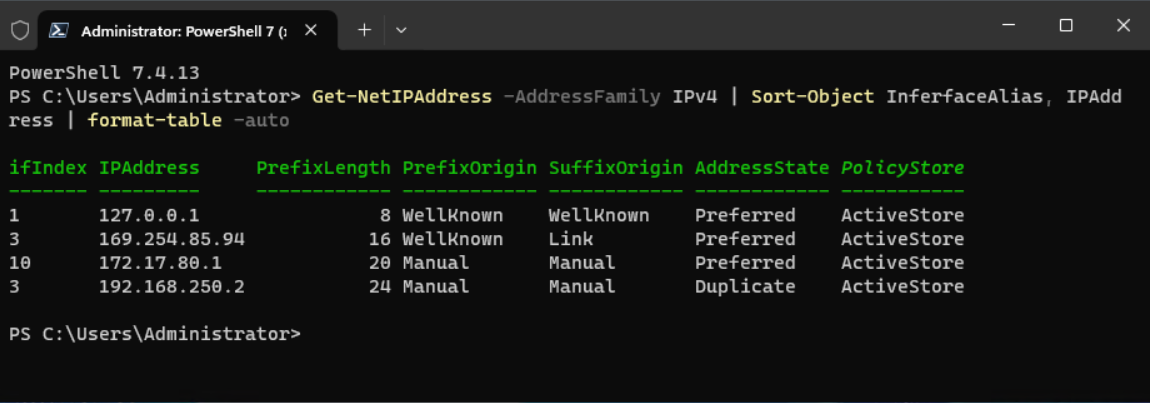
If I logged into the new VM and ran the command
Get-NetIPAddress -AddressFamily IPv4 | Sort-Object InferfaceAlias, IPAddress | format-table -auto
It returned two addressed for the interface 3, as opposed to one.
- 192.168.250.2 - the one I expected
- 169.254.85.94 - the Windows auto configure address
The Solution
The basic problem was I was had deployed two VMs with the same fixed IP address linked to the same virtual switch. So the fix was simple, just don’t do that.
What surprised me was the way the issue was presented. That as opposed to getting a network connection with strange network behaviours e.g. lost packets. I also got the auto configured address 169.354.x.x. and no valid network connection available.
Maybe next time I make a similar deployment error, maybe I will remember this root cause and not waste as much time.